Desktop Client
Installation issues
macOS cannot open the app or reports it as damaged
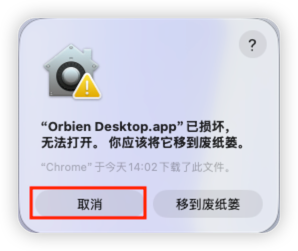
Downloaded .app / .dmg packages may be quarantined by the system. If the app cannot be opened, or macOS reports that it is damaged, run the following in Terminal:
xattr -cr "/Applications/Orbien Desktop.app"
open "/Applications/Orbien Desktop.app"
If the app is installed elsewhere, replace the path above with the actual .app location before running the commands.